 View on GitHub
 Program Architecture Reference
Program Architecture
- The following document gives an overview of the high-level architecture of the app, the interactions between and some justifications for these choices.
- While Swift supports other programming archetypes, such as function or protocol oriented programming, the majority of this app is UI based so Object-Oriented programming used. Due to limitations on project time and developer knowledge, the architecture likely does not follow strict MVC (Model View Controller) architecture, borrowing some concepts from MVVM due to the database model being shared between all classes.
Storyboard
- The storyboard is a feature of Xcode that allows developers to describe properties of UI elements and see them visually represented, without writing code. For this project this is primarily used to separate domains into different embedded views (shown by the grey lines) and layout UI elements.
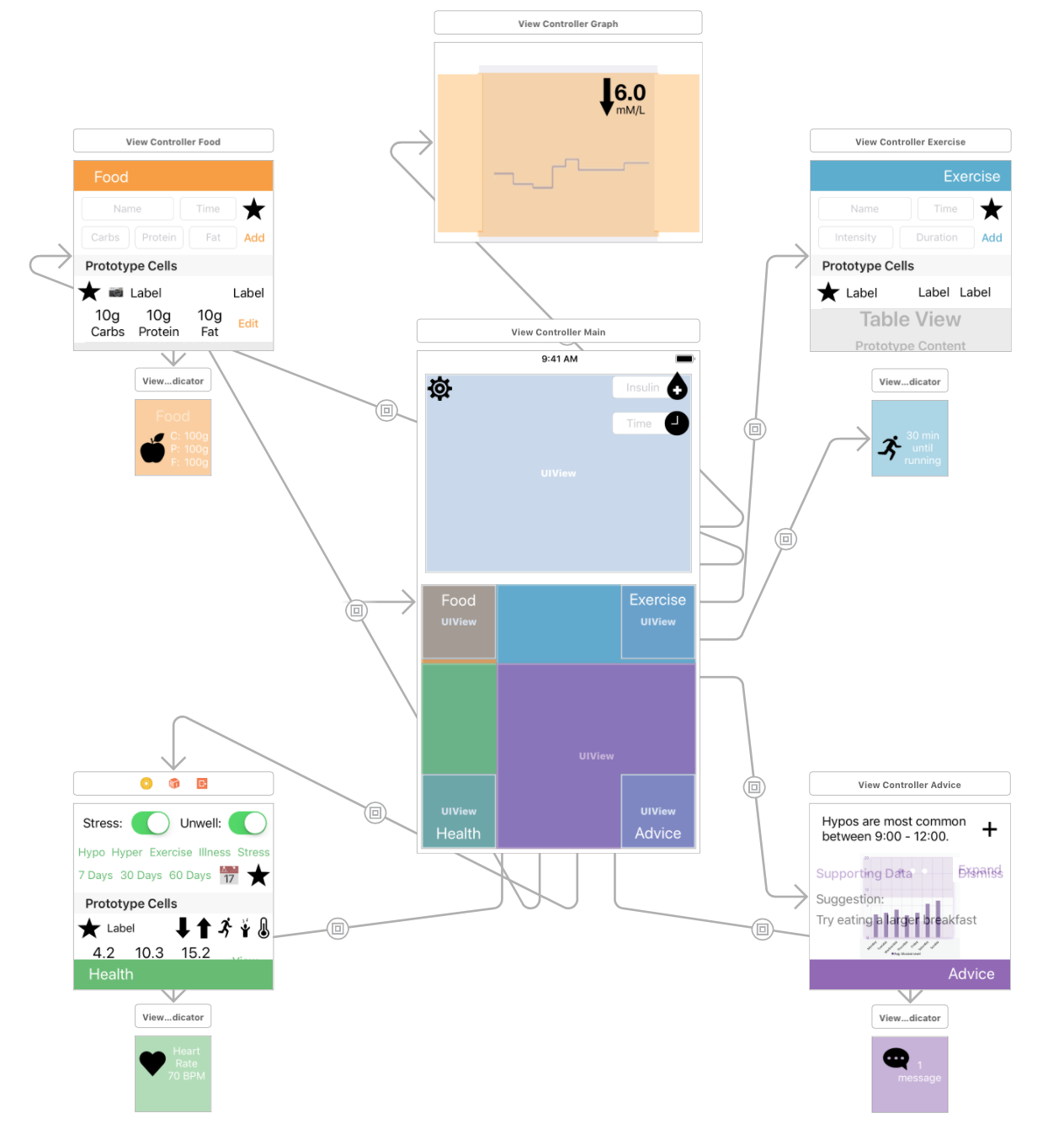
Image of app storyboard
Class responsibilities
- As visible in the image above, the app is separated into subviews. This is done to allow much easier manipulation of UI elements within the storyboard, where they would otherwise overlap and be difficult to select and adjust.
- Each subview has a class which acts as a View Controller, providing the code to power its interactions. This also reduces the size of View Controller files and gives each a more specific purpose.
- Some classes do not provide UI code, but act as a framework to interact with the model. For example, the
ModelControllerinteracts with the relational core database and provides functions that View Controllers can use to add/retrieve objects.
ViewControllerMain
Controls transitions between domains by showing and hiding domain and indicator views. Also controls insulin entry fields.
ViewControllerFood
Controls all UI elements in the open food domain. Calls functions in ModelController to add and fetch Meals logs.
ViewControllerExercise
Controls all UI elements in the open exercise domain. Calls functions in ModelController to add and fetch Exercise logs.
ViewControllerHealth
Controls all UI elements in the open health domain. Calls functions in ModelController to add Stress and Illness logs and fetch Day logs.
ViewControllerAdvice
Controls all UI elements in the open advice domain. Currently placeholder images and labels.
ViewControllerTableViewCell
Adds outlets and actions for table view cells, to allow other View Controllers to create tables, set cell labels and run functions when cell buttons are pressed.
ModelController
Provides functions to safely add and fetch objects from the persistent relational database in ‘Core Data’
ViewControllerGraph
Controls initialising and displaying graphs. Calls functions in ModelController to fetch Glucose logs, and the Meals, Exercise and Insulin for the displayed day.
Interactions
View Controllers communicate via 2 methods:
- Calling functions in other classes
- Observing notifications from other classes
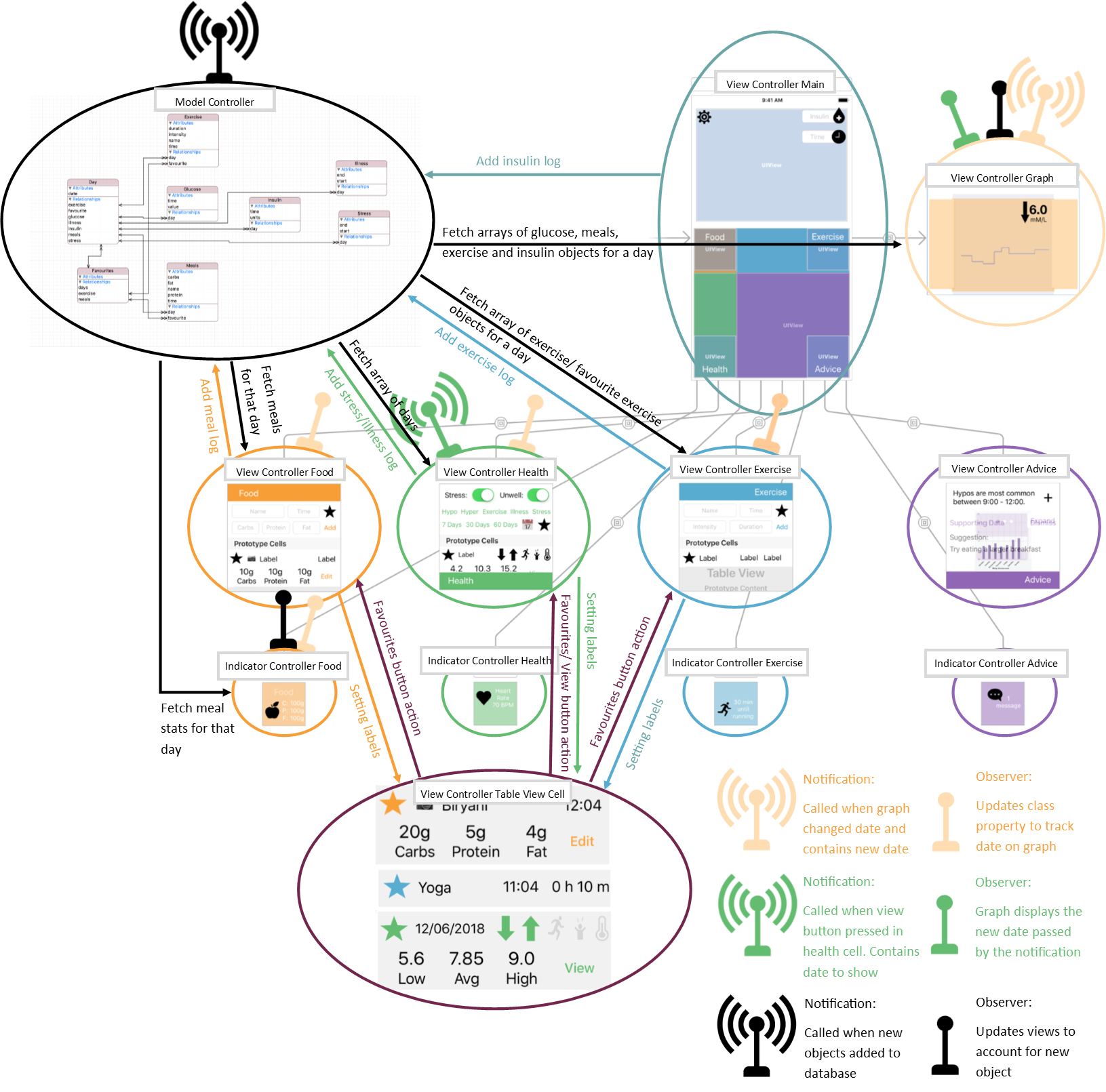
Image showing communication between the main classes
Open Image
Calling functions in other classes
- View Controllers can call non-private functions in other classes.
- In this case,
ModelControllercontains a set of functions to safely interact with the database, adding logs and fetching arrays of objects. It also provides some convenient filtering and sorting - This is done to provide a level of insulation between the View Controllers and the database to increase safety and reduce complexity of view controllers.
- It also allows functions to be called in several places without repeating code, and is a step towards creating a framework suitable for integration with the planned wearables
Radio/ Notifications
- iOS libraries contain a radio system called the Notification Center. This allows one section of code to ‘post’ a notification that an event has occurred. Separate sections of code can be set up to perform certain functions when an ‘Observer’ notices this notification.
- This is primarily used to update views when events occur. In this project, for example, when the day displayed on the graph is changed, a notification is posted and several View Controllers update their views to display information relative to the new day.
- Within the scope of the project, this seemed the best way to ensure the separate views were displaying updated information.